Plan
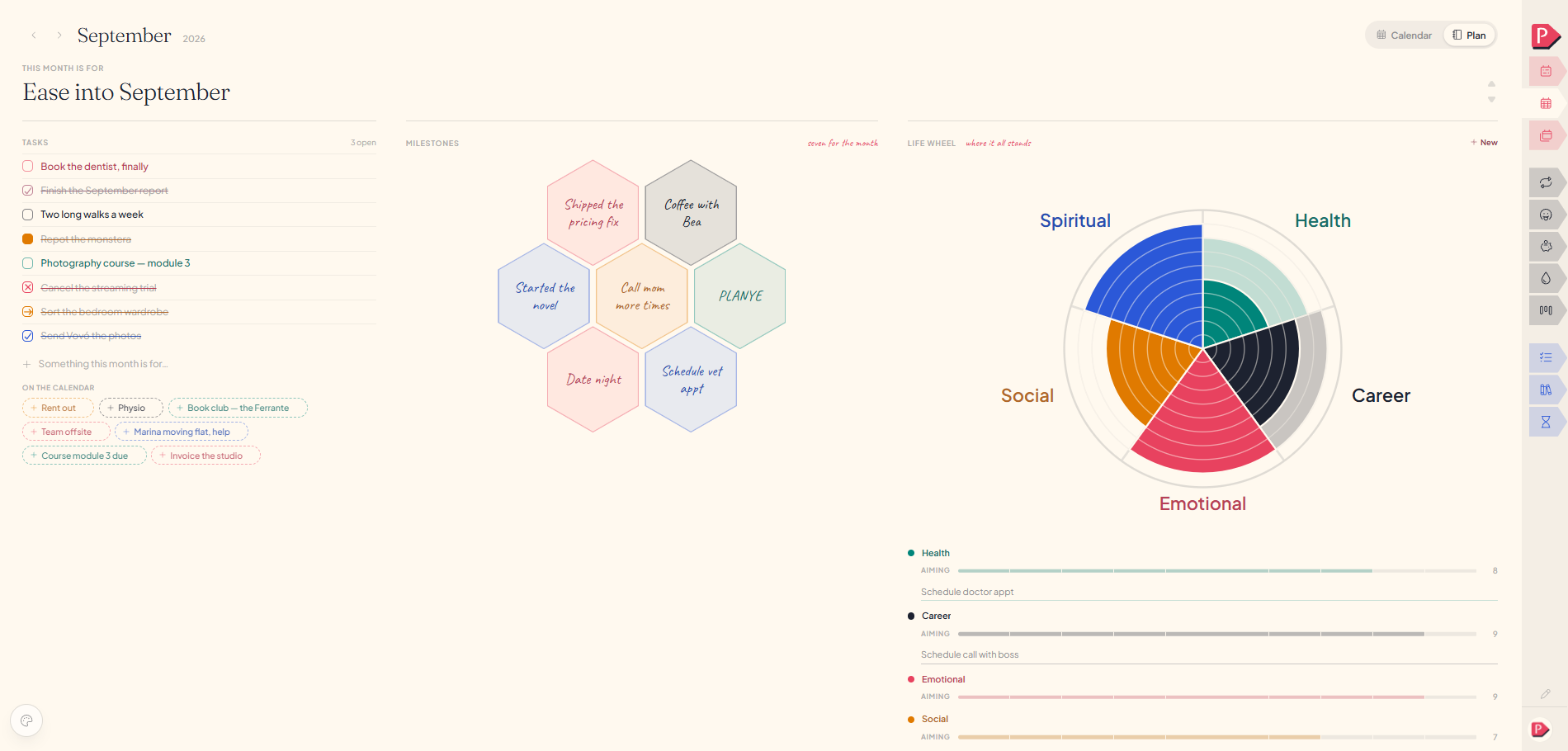
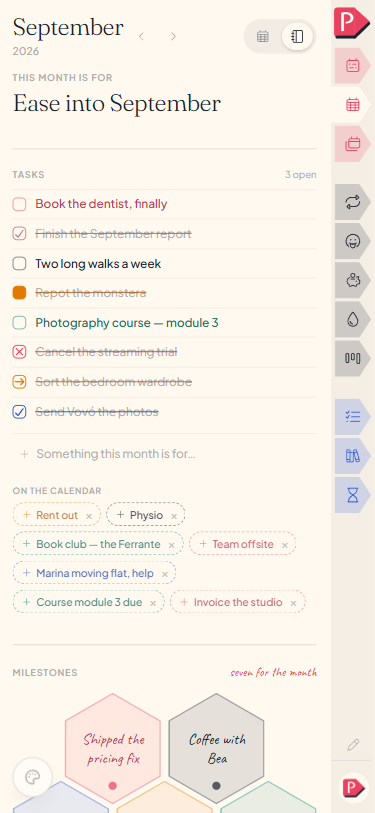
Plan is where you write what a month or a year is for, with no dates in it: Tasks for what you mean to do, Milestones for the seven things that would make it count, and a Life wheel for weighing the parts of your life. The month and the year each get one, and they work the same way.
- Name itThe line at the top, in your own words. "Survive" counts.
- Add a taskType into the field at the foot of the list, press Enter.
- Write a milestoneTap any of the seven cells and type in it.
- Weigh an areaSet where it stands and where you'd like it, then say what to do.
- Leave it emptyA month with nothing planned still runs perfectly well.
Tasks, Milestones and the Life wheel
A plan has three parts:
- Tasks, a hand-ordered list of what this month or year is for.
- Milestones, seven cells for the results that would make it a good one.
- Life wheel, the parts of your life you're weighing: where each stands now, where you'd like it, and what you'll do about it.
All three look forward. How the days actually went is **Tracking**, which sits under the month's calendar rather than here. See Month calendar.
Naming the month or the year
The line at the top is the name, in your own words. "Get the beta out" reads differently from "survive", and both are fine answers. Click it, type, and it saves as you look away.
There are no dates on this page. The calendar holds the 1st through the 31st; Plan holds the handful of things the month is about, and room to say why.
Adding a task
Type into the field at the foot of the Tasks list and press Enter. A colour picker appears as soon as there's something to name, so a task can carry a colour of its own; skip it and the task takes the first one.
- Tick it with the box on the row. The count above says how many are still open, or "clear".
- Reorder by dragging a row where you want it. Nothing sorts itself, so a finished task stays put.
- Remove with the × at the end of the row.
Tasks suggested from the month's calendar
Month onlyUnder the Tasks list sits a row headed On the calendar: anything you've already written straight onto a date this month, offered here as dashed pills rather than copied in.
Tap a pill to add it to the plan, and it stays on its date as well: the same thing in both places, not two copies to keep in step. The × removes the calendar entry itself, which is how you stop being offered it here and everywhere else at once.
See Month calendar. The year has no such row.
Milestones
A milestone here is a result, not a task: the thing you'd point at afterwards to say the month or the year went well. "Ran 10k without stopping" rather than "go running on Tuesday".
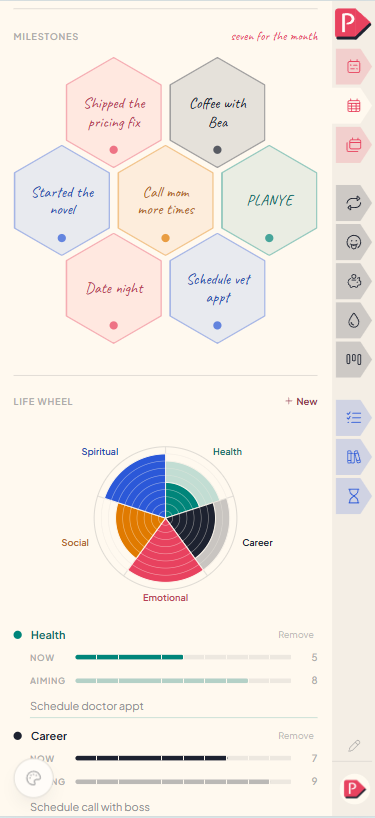
They're drawn as a honeycomb of seven cells, always all seven, whether or not you've written in any. Tap a cell to write in it (an empty one shows a +, a written one shows the words), then press Enter, or Escape to leave it as it was. A small dot under a written cell cycles its colour.
There is nothing to add and nothing to delete: seven, on the month and on the year alike.
it's meant to be a short listWriting a milestone, then cycling its colour
Writing a milestone, then cycling its colour, on a phone
Life wheel
Each area you name takes a slice of the dial, and every slice carries two readings out of ten, drawn one over the other so the gap between them is the picture:
- The pale wash is where you'd like that part of your life to be: the intention.
- The solid colour is where it actually stands today.
The pale band still showing is the distance left to cover. Nothing is averaged, totalled or compared with last month.
Press or drag a slice to move where that part of life stands to the ring under your pointer; with a slice focused the arrow keys do the same. Where you're aiming is the slider marked Aiming, under the area's name.
Each area's row carries both readings as a slider — Now and Aiming, ticked at every step out of ten, with the number beside it. The dial above is the drawing of them: solid for where things stand, pale for where you're aiming, the same as the tracks.
The "What I'll do about it" line only appears when the intention sits above where things stand, and goes quiet again once the gap closes.
New adds an area: name it, colour it, Add. Eight common ones (Health, Finances, Career, Social, Intellectual, Emotional, Spiritual, Family) wait as dashed pills, along with the areas you had last period, and one tap takes any of them. Up to twelve fit on the dial. Remove on a row takes one off.
Click an area's name to rename or recolour it right here.
The list reads rather than edits; open it at a desk to rename or recolour an area.
Adding an area, weighing it, and saying what to do about it
The month's plan and the year's
Both periods have one, and it's the same page with the same parts. What changes is the question each part is answering: not what this month needs, but what this year needs.
Nothing links the two or checks that they agree, so you're never required to break a year down into monthly steps.
the year asks fewer questions, on purposeQuestions about planning
The details, for when you want them. Nothing here is required reading.Should something go in the year's plan or a month's?
Whichever feels true. A task that only matters this quarter probably belongs to a month; something you want to be true by December belongs to the year.
Nothing links them, so you're never required to break a year down into monthly steps, and a year task you never act on is a year task rather than a backlog item.
How is a plan task different from a week task?
A plan task belongs to the period as a whole rather than to a category or a day. It carries its own colour instead of borrowing one, and it ticks like any other line, but it never sits in a category's square.
A month task offered into your week arrives with a plus rather than a checkbox, since it isn't yours until you take it on. See Week categories.
Does taking a calendar suggestion remove it from its date?
No. Tapping the + adds it to the plan and leaves it on its day, since it's one thing in two places rather than two copies. The × is the one that removes it, and it removes the calendar entry itself.
Does the next one start with this one's plan?
Tasks and the wheel's areas do, as drafts: lightly drawn, one tap to keep, silent if you leave them be. The things you're tracking are offered back the same way, on the calendar where they live.
Milestones never carry, at either period, because they belong to what that stretch of time was rather than to a plan you might repeat.
How is this different from Memories?
Plan looks forward, at what the period is for. Memories looks back, once enough has happened to say what it turned out to be. See Memories.
Can I reorder the task list?
Yes, by hand: drag one where you want it. Nothing reorders itself, so a task you've finished stays where you left it rather than jumping to the bottom.
Do I have to fill any of this in?
No. An empty plan is a month you're living without one, and nothing counts the cells you left blank or asks about them later.
a blank plan is a fine plan