Money
Money is envelope budgeting, one sheet per month: your income and fixed bills, envelopes you name for planned spending, and a ledger of every expense underneath.
- Add anything, on a phoneThe + button. It asks which of the five you mean.
- Add income or a billThe Income and Fixed bills lists. Name it, cost it.
- Add an envelopeUnder Where it went. A name, a colour, a plan.
- Log a spendThe line above Variable expenses. Every figure comes from it.
- Set your currencyAdjust. Type the mark you use; blank shows bare figures.
- Put money asidePut away. Where it is, what was there, what you added.
What's on a month's sheet
Money opens onto Budget: one sheet per month, which resets each month the way a budget genuinely does. It reads in the order the money is decided:
- Income and Fixed bills: what was settled before the month started. Nothing left to decide.
- Where it went: your envelopes, the categories you plan variable spending in, drawn as a ring and a set of bars.
- Variable expenses: the ledger. One line per spend, and every figure above it is counted from these rows.
- Put away: savings and anything else you set aside.
- Notes: a free box for why the month looked like this.
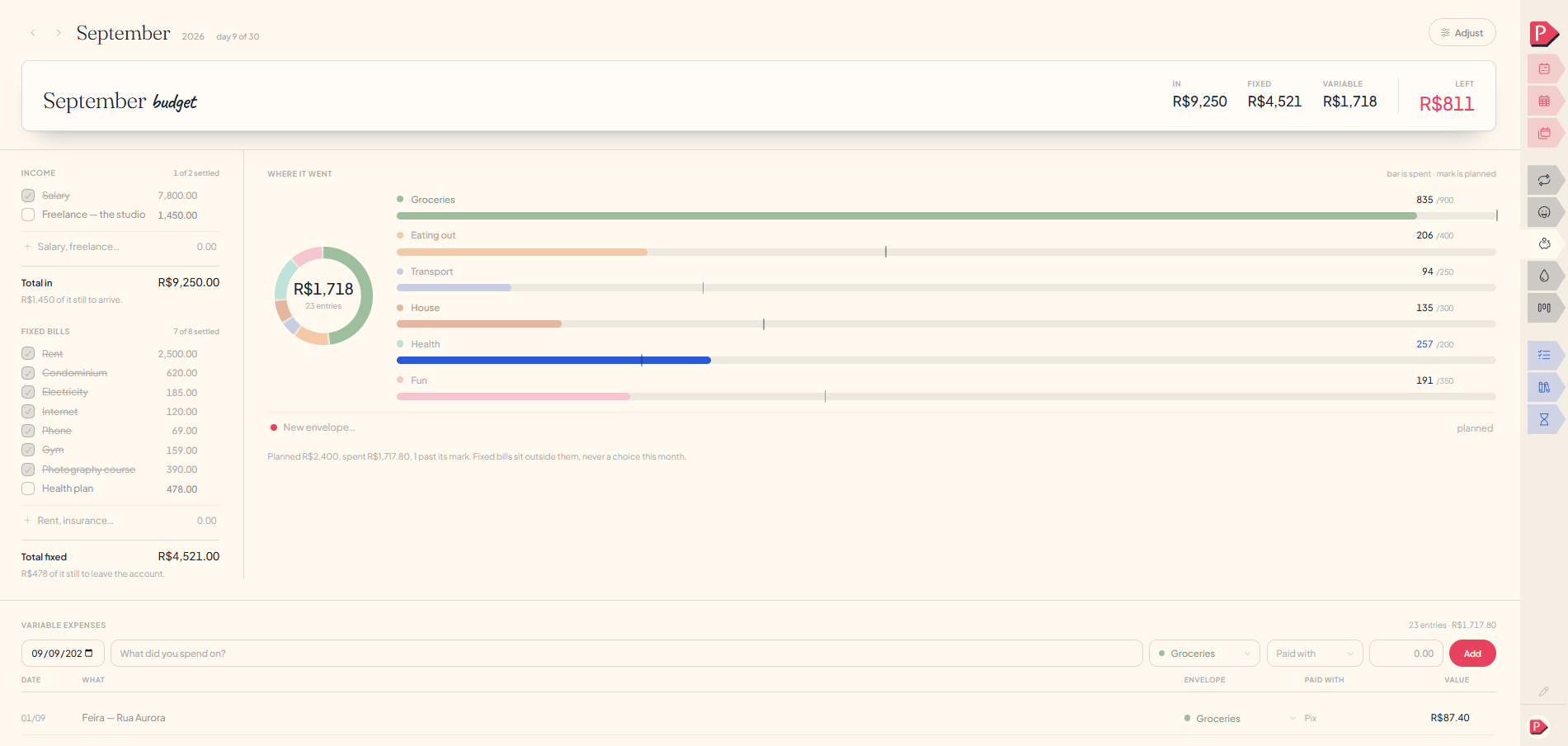
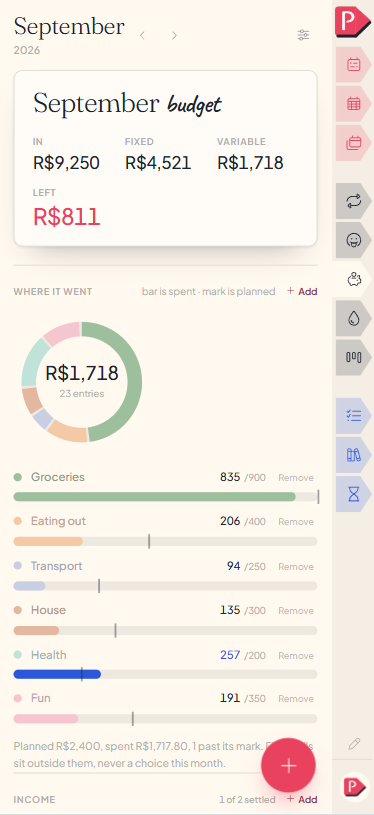
In, Fixed, Variable and Left
The card at the top of the sheet leads with Left, the one figure that answers how the month is going. Under it, one bar shows where the income went, with each part named below it. All of it is worked out for you:
- In everything on the Income list, added up.
- Fixed everything on the Fixed bills list.
- Variable the whole ledger of expenses underneath.
- Left what's left once Fixed, Variable and what you put away come out of In. It's the darkest part of the bar.
Beside the month's name, the header says which day of it you're standing in, with arrows to step months and This month to come back.
Adding income and fixed bills
Two lists of the same kind of row, split by whether money is coming in or going out. Each line is a name, a figure, and a box to tick once it's actually landed.
Type into the line at the foot of either list (the name on the left, the amount in its own shaded box on the right), then press Enter or click away. Leave the amount blank and it files as zero. If the name is missing, or the amount isn't a number, Enter shakes the field and says so.
The + button at the bottom of the screen asks which — Income or Fixed bill — then opens a small drawer: a name, an amount, done. Leave the amount blank and it files as zero.
- Tick a line when the money has moved. Its box fills and the line fades, and the heading counts "3 of 6 settled" and stops there.
- Remove a line with the × at the end of it. An undo line appears straight after, at any width.
- Last month's lines wait underneath as dashed pills with their old amount on them. One tap writes one in; ignoring them costs nothing.
Click a name or an amount to rewrite it in place.
Tap a name or an amount to rewrite either in a drawer.
Total in and Total fixed sit under their own list: everything on it added up, ticked or not, with one quiet line saying how much of that has not moved yet.
Adding a line to Income
Adding a line to Income, on a phone
Adding a line to Fixed bills
Adding and removing envelopes
The envelopes are the categories under Where it went, and an envelope is a name, a colour and a planned amount: Groceries, Going out, Transport, whatever you actually spend on. Every expense in the ledger is filed under one.
Type into the line at the foot of the list: a name on the left, the plan on the right. A row of colours appears as soon as there's a name, and the dot beside the field already wears the one it would take. Enter or a click away files it.
The + button at the bottom of the screen, then New envelope, opens a drawer: a name, a colour and what you plan to spend.
Tap the name, the dot or the plan of one that already exists to change all three in a drawer.
- Change the plan by clicking the small figure after the slash on the row, the "spent / planned" pair.
- Rename or recolour by clicking the name, or the coloured dot beside it. Every entry already filed under it follows.
- Remove on the row takes the envelope off the month, with an undo line behind it. Expenses filed under it stay in the ledger and simply stop showing a category.
- Last month's envelopes wait underneath as dashed pills, carrying their name, colour and plan and none of what was spent.
Leave the plan at zero and the envelope draws no mark at all, so a first purchase against it never reads as going over. There's nothing yet to go over.
Adding an envelope and giving it a plan
Adding an envelope and giving it a plan
Logging what you spent
Variable expenses is the ledger, and the one part of the sheet you write into rather than read. Every number above it is worked out from these rows, so if a figure ever looks wrong, this is the one place to go looking and the one place to fix it.
Every field in the line above the list already holds a sensible answer, so the short way through is a description, an amount, and Add:
The + button at the bottom of the screen, then Variable expense, opens the same five fields in a drawer. Each already holds a sensible answer, so the short way through is a description, an amount, and Add:
- Date opens on today and can't leave the month you're reading.
- What what it was, in your own words.
- Envelope which category it comes out of.
- Paid with card, cash, or whatever you keep. See Adjust below.
- Value what it cost. Enter files the line, same as Add.
On an existing row, click what it says or what it cost to rewrite either, and use the envelope box to refile it. Moving a supermarket run from Groceries to Household is the most common correction this page gets. The × removes a line, with an undo behind it.
Each row reads its date, envelope and payment on a second line under the description. The × removes a line, with an undo behind it. Tap the row to change what it says, what it cost or its envelope.
A line filed under no envelope simply draws nothing beside it.
Logging a spend in the ledger
Reading the ring and the bars
Where it went draws the same spending twice, because "what took the biggest share" and "what went past its plan" are different questions:
- The ring is proportion: how much of everything you spent went on food. Its middle carries the month's variable total and how many entries it came from.
- The bars are each envelope against its own plan, on one shared scale so two are honestly comparable.
On every bar, the bar itself is what you spent and the mark on it is what you planned, which is what the note beside the heading means.
Under the list, one line adds it up: what you planned, what you spent, and how many envelopes are past their mark. Fixed bills are deliberately outside all of this, since they were never a choice this month.
Setting your currency and how you pay
Adjust, in the header beside the month, opens the two things the page needs told rather than worked out.
The settings mark at the far right of the month's own line, past the arrows, opens the two things the page needs told rather than worked out.
- Written in: the mark you actually use, whether R$, €, kr, £ or anything else. It's a box rather than a list of countries, and leaving it empty draws bare figures.
- Paid with: the ways you pay. Three are already written the first time you open Money; type a name and pick a colour to add another, and Remove takes one off. They aren't scoped to a month, since how you pay isn't something you re-decide every January.
Neither is a question you have to answer first, and removing every way of paying just leaves the ledger one column shorter.
Adding a way of paying in Adjust
Put away (savings)
Put away is where savings live: a savings account, a pot, a fund, anything you set money aside in. Each one is three columns: Before, This month and Balance.
- Before what was in it when the month began.
- This month what you added to it.
- Balance the two added together. It's never typed, so the sheet can't disagree with itself.
Add somewhere, or type into the line at the foot: a name, and what was in it before this month. Click either figure on a row to correct it, and Remove beside the name takes the whole holding off.
The + button at the bottom of the screen, then Saving destination, opens a drawer: a name, and what was in it before this month. Remove beside the name takes a holding off. Tap a holding to correct its name or figures.
Next month opens with this month's closing balance already in the Before column, so you only ever type what changed. What a holding earned on its own is not tracked here.
Putting money aside somewhere new
Putting money aside somewhere new, on a phone
Nothing here goes red
An envelope past its plan keeps its colour, and the part past the mark is striped. Nothing anywhere says "over budget". No red, no warning: the bar and the mark tell you the figure, and you decide what it means.
money is the thing people already feel worst aboutQuestions about money
The details, for when you want them. Nothing here is required reading.What happens when I go over an envelope's plan?
The bar grows past its own mark and the envelope shifts to a second colour from your theme. No badge, no percentage, no warning. The line under the list says something like "Two past their mark" and stops there.
Can the Left figure go negative?
Yes, and it is the only figure on the page that can. It uses the same colour as an envelope that went over, with a minus sign in front. No arrow, no extra word.
What happens to my expenses if I remove an envelope?
They stay in the ledger, untouched, and simply stop showing a category beside them. Removing a category has never been a reason to lose the record of what you actually spent.
An undo line appears straight after, and any line can be refiled under a different envelope: the box on the row at a desk, or a tap on the row on a phone.
What carries forward into next month?
- Fixed lines carry their name and amount, never their tick.
- Envelopes carry their name, colour and plan, never what was spent.
- Holdings carry last month's closing balance as this month's opening figure.
Ledger entries never carry. A supermarket run is a thing that happened in August.
What are the small payment pills on each entry?
Ways of paying: card, cash, whatever you use, three of them there from the start. They aren't scoped to a month, since how you pay isn't something you re-decide every January. Remove all three and the ledger runs with one fewer column.
How do I set the currency?
Type the mark you want, R$, €, kr, whatever reads right to you, rather than picking from a fixed list. Leave it blank and figures show bare.
Does Money track how my savings or investments performed?
No. A holding is three plain figures: where it stood, what you added, where it stands now. What it earned on its own is a different question, and Planye doesn't have an opinion about your portfolio.
Can I connect a bank account?
No. The value of a ledger you type yourself is that writing the line is the moment you actually noticed the spend. An imported feed would be someone else's list.
Where does a project's budget fit in?
It stays with the project, since a project runs across months and this sheet is one month. Nothing on either page adds itself to the other.